Showing posts with label hack. Show all posts

Wednesday, 16 March 2016

Hackers Breached the official email servers of Bolivian Army

Hackers Breached the official email servers of Bolivian Army


Hackers Breached the official email servers of Bolivian Army

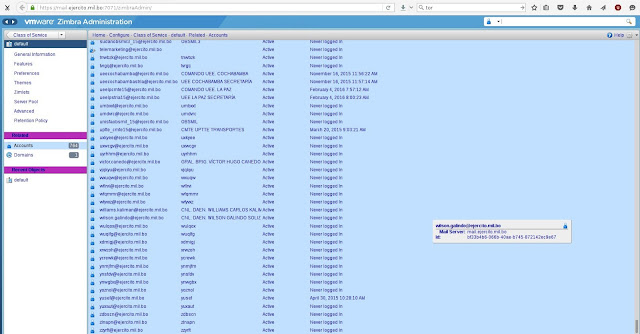
A group of hackers ( Hanom1960, Chilean Hackers crew and Hazzard) breached Bolivian Army email servers and dumped data, but it doesn’t contain any sensitive military or state secrets.

According to Softpedia,” The Bolivian Army was running their internal email server on VMWare’s Zimbra service. The hackers used an old software called Zimbra exploit.”

Hackers Breached the official email servers of Bolivian Army

The data dumped by hackers contains information of officers name, positions and emails exchanged between officers, like conference invitations, activity reviews, and some boring stuff.

After dumping the data online, hackers started to tweet about their emails of various army members and their passwords.

The hackers said that they took a special interest to breach Bolivian Army servers after the rampant corruption in its ranks.

Source Link – Softpedia
Bohatei – Free DDoS Hacking defense tool

Bohatei – Free DDoS Hacking defense tool


 Bohatei – Free DDoS Hacking defense tool

Bohatei, a free DDoS defense tool that works using SDN and NFV. This tool defense 500Gbps DDoS attack and successfully handle any dynamic attack scenarios.

Features and File information:

  • An implementation of the FlowTags framework for the OpenDaylight controller
  • An implementation of the resource management algorithms
  • A topology file that was used to simulate an ISP topology
  • Scripts that facilitate functions such as spawning, tearing down and retrieving the topology.
  • Scripts that automate and coordinate the components required for the usecases examined.
The folder “frontend” contains required files for the web interface. For the experiments performed, we used a set of VM images that contain implementations of the strategy graphs for each type of attack (SYN Flood, UDP Flood, DNS Amplification and Elephant Flow). Those images will become available at a later stage.
The tools that were used for those strategy graphs are the following:
For more information about Bohatei you can visit GithubYou can check out Bohatei papers here and slides here.

Free Download: Bohatei (from github)
Hacking news: Anonymous Hackers breach South Africa’s Department of Water Affairs

Hacking news: Anonymous Hackers breach South Africa’s Department of Water Affairs

 Hacking news: Anonymous Hackers breach South Africa’s Department of Water Affairs


Recently anonymous hackers have breach South African Government’s website database as part of #OpAfrica campaign

Now the hackivists involved in the #OpAfrica and #OpMonsanto campaigns and have breached South Africa’s Department of Water Affairs (DWA).

Hackers have breached the site’s database, stolen all its data and dumped it online. The dumped data on online contains names, emails, ID numbers of over 5,800 government employees and collaborators.

It’s not over, even phone numbers, date of birth, addresses, departments where they work, job titles, and hashed passwords  has been dumped online.

Hackers got access to the site’s administration panel, and got all the user details.
Security tips - How hackers hack your Paypal account

Security tips - How hackers hack your Paypal account

Security tips - How hackers hack your Paypal account
Today when I was checking my Inbox I got this mail from Service Paypal saying that, ” Your account has been limited until we hear from you.”. And when I open the mail it seems to be a phishing page from hackers to steal my login details.

Security tips - How hackers hack your Paypal account


1. Look at the address of mail sender. When you receive a mail from Paypal look what is write after “@”. It must be “paypal.com”.

2. Look out for text errors in the mail. In official mail from Paypal you wont have any errors.


3. If you still don’t find the above 2 options and you open the link given by them, then check out for the URL, it should be “paypal.com” or “paypal.co.uk” or “paypal.in” depending upon the country or where you live. As you can see from the image given below shows “qaypal .co.uk” which is not official one and its a phishing page to get users login credentials.

This is what you get when you click “Login Now” link from your email


This is how a phishing page looks like

4. So this is how the mail looks after you enter your login details.
So make sure you don’t fall into phishing scam from hackers. Be careful when you open a website link from your mail. This format of phishing almost works on other sites too, such as Facebook, Twitter and few other popular networks. We care for you, so we share this simple information to you. If you care about your friends and family then drop a share.

NOTE: The graphic design of these website would be as same as the official website so be careful when you visit.

Monday, 7 March 2016

 5 Common Hacks & Advice on How to Defend Against Them

5 Common Hacks & Advice on How to Defend Against Them


You may think that hackers are excessively clever people who are coming up with improbable hacks around elaborate security systems, and some are, but most rely on a few old tricks that have been around for years.

I am going to look at 5 common hacks that are used so that you can become aware of them, as knowledge is the first line of defense. I will then give you some actionable advice on what you can do to defend against these common hacking techniques.

Common hacks 1: Bait and switch

There have been countless ‘bait and switch’ scams over the years. I’m talking “years” as in over the last century. Things haven’t changed much in the computer age as bait and switch style hacks are still used.
Commonly, they’ll buy legitimate advertising space on websites. The hacker will switch the link contained within the ad from the approved one to a malicious one, or they’ll code the legitimate website to take the user to a malicious site. Clever hackers will give away something free, like a website counter, and allow thousands of websites to use it - and then switch it out for something like a nice fat JavaScript redirect.
How to defend: Given the large variety of bait and switch hacks out there, it’s difficult to give advice on them. The first point is to make sure that you understand that anything you don’t control can be manipulated. If it isn’t your web counter, someone can exploit it. If you didn’t find the website yourself, the ad can direct you somewhere you don’t want to be. These can be defended against by simply going to trusted resources for your web counters, or doing your own search for the content within the ad.

Common hacks 2: Cookie theft

Cookie theft, also known as session hijacking, enables people to assume your online identity on popular websites. This allows them to log into your accounts, taking over your social media accounts, as well as making purchases in your name.
To make matters even worse, there’s even a program called Firesheep that allows people to do this with a few clicks while using another trick we’ll talk about next, the fake wireless access point. All it takes is a few clicks, and they’ll take over your identity.
How to Defend: Try to always use websites that have secure development techniques and the latest cryptography. A tool that can help you do this while using Google Chrome is called KB SSL Enforcer.
The KB SSL Enforcer plug-in forces your browser to go to the most secure version of websites. This will be the one that starts with HTTPS, with the ‘s’ being ‘secure’ and referring to TSL cryptography. It is not 100% protection, but it does make things more difficult. If hacking you is a challenge, hackers are more likely to move on to someone who hasn’t read this list!

Common hacks 3: Fake Wireless Access Points

Everyone loves free wifi, including hackers. How this hack works is a hacker will set themselves up in a public location, a coffee shop, restaurant, airport, or public library as examples. They’ll establish a fake wireless access point (WAP) of their own and name it something that makes it sound official: “McDonalds Free WiFi” or “Laguardia Free Connection.”
Those who are looking to make a quick connection, for free, will then establish a connection to these WAPs. There are two ways that a hacker can steal information. The first is that they can set it up so that you have to enter a username and password to connect. Most people use a common username and password for these quick “set it up and forget it” accounts. Hackers will then take that information and use it to try to log into your Twitter, Facebook, Amazon, iTunes and other popular accounts. This is one example of online identity theft.
The other way that a fake WAP will work is by the hackers just sifting through the information that is going through the connection and taking whatever isn’t protected or encrypted.
How to defend: First, ask the proprietors of the establishment what the correct name is for their WiFi. That’s the easy one. Next, be sure to always use a unique password and login for public WiFi. It may be a pain, but it’s your best form of online protection.
To protect against those who sift through and steal information that isn’t encrypted, use a personal VPN to encrypt all of your communication. You can read more about top VPN services over on the blog I work for.

Common hacks 4: False file names

This work by tricking people into clicking on files that look enticing, like BeyonceNipSlip.avi, but are actually files full of malicious code when opened.
One of the most famous examples of this right now is one known as the Unicode character switch. It fools computers into displaying a file that is actually BeyonceNipSlip.exe (an executable file that can tell your computer to do things) as the less harmful looking BeyonceNipSlip.avi (.avi being a video file).
You then open it thinking you’re going to see a video of a small slice of heaven (sorry, clearly Beyonce biased), and instead get a computer full of something bad.
How to defend: This is one of those instances where you have to do your homework. If someone is sending you a file, be sure that you know what the full name is with the extension. If you don’t know who is sending you the file...don’t open it! If you have a virus scanner which allows you to scan individual files before opening them, put it to work.

Common hacks 5: Wateringhole attacks

Watering hole attacks can be related to point 3, but with more focus and malice. Hackers will scope out a common place where employees of their target company hang out for drinks, dinner, or even online social platforms - a ‘watering hole.’
These employees are often more relaxed about their security, but since they’re with co-workers they’re still prone to discussing business matters. The hackers will then either install fake WAPs in the physical location that they gather to get company credentials, or they’ll install harmful JavaScript redirects into the online places that these people visit.
The hackers will then use the login details or compromised workstations to gain access to the inner workings of a company. Notable wateringhole attacks have happened to Apple, Microsoft, and Facebook.
How to defend: Making it known to your employees is the first step. They can not use their same credentials on their workstation and on these types of sites, or in these locations. Like it or not, in today’s digital world, your employees have to act as if they’re always at work.
Tuesday, 1 March 2016

Kali Tutorial : Metagoofil (Extract Information from Docs,Images and more !!)

Kali Tutorial : Metagoofil (Extract Information from Docs,Images and more !!)

              Metagoofil is an excellent Information gathering tool that can be used for extracting tons of Information from Word Documents, PDF’s, Excel Sheets, .jpg Images and lots of other formats . Metagoofil therefore can provide a lots of fruitful information during the penetration testing just by scanning the files gathered. Lets learn how to extract information from documents, images using Metagoofil Tutorial.
This will become more clear with the following example : Not very far back , I was conducting a Penetration test for one of my company’s client that was a fortune 500 . Now they had certain files uploaded and also some presentations all present over the internet . Well , very common and shouldn’t be a problem. But on analyzing these documents we were able to get Email , mobile phone number and some more information of high level employees . These were further used to social engineer our way into the organisation.

 Metagoofil already exists in Kali Linux and is an excellent tool to use when it comes to analyzing the files for Meta Data in them . This Meta Data is just some Data about the file and used by the programs . The Meta data is neither ment to be seen by the user nor of any use for the user . Its there to be used by the program.
Metagoofil can be used to extracting the Meta Information from a variety of formats such as  word , pdf , .jpg etc including the HTML web pages.

Here is a Tutorial on the Usage of Metagoofil for Penetration Testers:
Metagoofil can be found on the menu such as picture below:
Metagoofil Tutorial on Kali Linux
Finding Metagoofil in Kali Linux 
To start using Metagoofil , Open terminal :
root@kali:~# metagoofil
This is what you should see on the terminal
 ******************************************************
*     /\/\   ___| |_ __ _  __ _  ___   ___  / _(_) | *
*    /    \ / _ \ __/ _` |/ _` |/ _ \ / _ \| |_| | | *
*   / /\/\ \  __/ || (_| | (_| | (_) | (_) |  _| | | *
*   \/    \/\___|\__\__,_|\__, |\___/ \___/|_| |_|_| *
*                         |___/                      *
* Metagoofil Ver 2.2                                 *
* Christian Martorella                               *
* Edge-Security.com                                  *
* cmartorella_at_edge-security.com                   *
******************************************************

 Usage: metagoofil options

         -d: domain to search
         -t: filetype to download (pdf,doc,xls,ppt,odp,ods,docx,xlsx,pptx)
         -l: limit of results to search (default 200)
         -h: work with documents in directory (use "yes" for local analysis)
         -n: limit of files to download
         -o: working directory (location to save downloaded files)
         -f: output file

 Examples:
  metagoofil.py -d apple.com -t doc,pdf -l 200 -n 50 -o applefiles -f results.html
  metagoofil.py -h yes -o applefiles -f results.html (local dir analysis)
Here is a screenshot of the Metagoofil .
metagoofil-kali

metagoofil Usage Example 1

root@kali:~# metagoofil -d kali.org -t pdf -l 100 -n 25 -o kalipdf -f kalipdf.html

******************************************************
*     /\/\   ___| |_ __ _  __ _  ___   ___  / _(_) | *
*    /    \ / _ \ __/ _` |/ _` |/ _ \ / _ \| |_| | | *
*   / /\/\ \  __/ || (_| | (_| | (_) | (_) |  _| | | *
*   \/    \/\___|\__\__,_|\__, |\___/ \___/|_| |_|_| *
*                         |___/                      *
* Metagoofil Ver 2.2                                 *
* Christian Martorella                               *
* Edge-Security.com                                  *
* cmartorella_at_edge-security.com                   *
******************************************************
['pdf']

[-] Starting online search...

[-] Searching for pdf files, with a limit of 100
        Searching 100 results...
Results: 21 files found
Starting to download 25 of them:

metagoofil Usage Example 2

metagoofil -d example.com -t doc,pdf -l 20 -n 10 -o ddos -f example.html
 
Hope you like this post. Feel free to share to your social space 
 
 
reference: hackingloop 

Saturday, 27 February 2016

How To Remove Computer Viruses Using CMD

How To Remove Computer Viruses Using CMD

How To Remove Computer Viruses Using CMD

There is the unconventional method to remove a virus from a computer system which includes antivirus programs and firewalls etc. But today we are discussing here a method by which you can easily Remove Computer Viruses Using Cmd. The method is simple and straight. Just read out the below post to proceed.

How To Remove Computer Viruses Using CMD

Actually, the command prompt is a utility program that has an access to reconstruct all the system files, and in this method, we will be using the same access of cmd. This method works on attributes removing which can be one reason of virus. As the most probable reason for the virus to come into your computer is through USB device. So this method works perfectly on USB to remove its viruses and secure your computer.

Steps To Remove Computer Viruses Using Command Prompt

  • First of all click on Start and type cmd. Now right click on a the cmd icon and select run as administrator. Now command prompt window will open, now select your drive which you want to remove a virus.
  • Let the drive be D. So now type “dir D: attrib -s -h /s /d *.*” Now type  then press enter.
  • Note: Capital D is the considered as the drive to be checked you can change the drive according to your needs.
  • Now the command prompt will explore your selected drive and will load all the files on your drive.
  • Now if you notice and unusual file.exe and any of autorun.inf then rename it with the command(rename filename.extension new filename)
  • That’s it now you can access your drives without affecting from viruses.


This method is very cool and efficient and doesn’t require any software just only a simple utility program of your system and simple cmd tricks. Hope you like the post. Don’t forget to share it with your friends.

Sunday, 14 February 2016

Indian Websites More Vulnerable To Attacks by Pakistani Hackers

Indian Websites More Vulnerable To Attacks by Pakistani Hackers

Indian Websites More Vulnerable To Attacks by Pakistani Hackers

Indian and Pakistan have been rivals since decades. Besides this, hackers from both countries show their aggression in hacking government or individual websites. For example Indian Hackers deface Pakistani Websites while as Pakistani Hackers deface Indian Websites. It seems that this rivalry may never end.

CIA-backed threat intelligence company has claimed that, Indian Websites are more vulnerable to attacks by Pakistan Based Hackers. Also, Indian websites are more vulnerable to cyber attacks during high profile functions like Independence Day and Cricket Matches.

Indian Revenue Service’s Website was allegedly hacked by Pakistan Based Hackers. The website which was hacked by suspected Pakistani Hackers belonged to Income Tax Department and was left inaccessible for a while.

The report also suggests that India and Pakistan’s Independence day are celebrated on August 15 and 14 respectively which creates a predictable pattern of cyber attacks by the rival hacker groups.

The report further stated that PCA (abbreviated as Pakistan Cyber Army) openly posts online tutorials on social networking websites about “How to Hack Indian Websites”. Earlier, PCA hacked the website of  Central Bank of India, State Government of Kerala, Indian Oil and Natural Gas Corporation, the Central Bureau of Investigation etc.

Both Indian and Pakistan’s government must take some steps in order to develop friendly relations with each other. Hackers from both countries are seen defacing the websites of the countries which they oppose. We hope that you loved this article, feel free to share this with your friends.


Friday, 12 February 2016

How To Send Encrypted Mails In Google Chrome

How To Send Encrypted Mails In Google Chrome

Send Encrypted Mails In Google Chrome
Security is just an illusion and this thing mainly concerns with our privacy in the virtual world. And if you think you are secure on your device then you are totally wrong as your privacy can easily get compermise every second. And you must ensure it before doing any activity over internet. Now talking about mailing services which is just peer to peer communication thats too is not at all secure, as you sent or received mails can be read by someone else too that is well known as man in the middle attack and for this you must secure your mailing network. And thats only possible with some encryption technique and you probably don’t use this method till now. And thats why we are here with the guide by which you can encrypt your emails, So have a look on complete guide discussed below to proceed.

For google chrome there are lots of extensions that had been introduced till now which are really cool and helpful and here we discussing one of them by which you can easily encrypt your mails in Gmail. For that just follow up some simple steps below.


Steps To Encrypt Emails In Google Chrome Using Secure Mail for Gmail Extension
  •     First of all in your google chrome you need to download and install the cool extension that is Secure Mail for Gmail Extension.
  •     On the extension page you need to click on Add to Chrome button and then a pop up will appear where you just need to click on the button Add.
  •     Now the extension will successfully get added to your browser.
  •     Now open the gmail from which you want to send encrypted mails.
  •     Now you will see a lock sign after compose simply click on that. Now you will see a box to send encrypted mails.
  •     There enter all your details regarding address subject and the mail and click on send.
  •     Now you need to enter the password there to secure your email with password and repeat it again.
  •     Now simply send the mail and your encrypted mail will get sent and on the receiver end there will need of this extension and the same password to decrypt the mail.
  •     Thats it you are done, now you ensures your privacy is ensured with this and you can easily send encrypted mails that will only be accessible to the authorized persons

Thursday, 11 February 2016

HACK NEWS:: Android Root Malware Common in Third Party App Stores

HACK NEWS:: Android Root Malware Common in Third Party App Stores

Android Root Malware Common in Third Party App Stores

Trend Micro, found about 1,163 android APK’s contain malware’s with name as ANDROIDOS_ LIBSKIN.A. The security company also claimed that between January 29 and February 1, apps containing this malware have been download in 169 countries and surprisingly found on the popular third party app stores, Mobile9, Mobogenie, 9Apps and Aptoide. The security company said that they have contacted these third party app stores and informed them about the malware’s in their apps but they didn’t received any response from their side.

Security Experts also had warned users to not download any app from third party app stores because they may not monitor the quality control as Google’s Play Store.

When you download any app in android from unknown source, your device notifies you whether you want to allow permissions for this app. Also, if you want to secure your device, you must download apps from only Google Play Store. Google monitors app greatly while as third party sites don’t monitor the apps they offer through their websites.


However, the question arises, Why people download apps from third party app stores when they have Google Play Store. The answer its that these malicious apps lure users in order to get more and more downloads from the users.

Also, my friend complained me that his device is filled with unnecessary apps and sometimes he find apps having porn images displayed. Later, he informed me that he always downloads apps from third party app sites. I later asked him why you download apps from third party sites, he said I am using 2G Internet pack, so Google Play Store doesn’t get properly loaded, that’s why I choose third party sites. There are several reasons why users download apps from third party sites.

The malware also fetches data, like the device ID, network and the other apps running on the device and more.

Wednesday, 10 February 2016

Anonymous hacking using VPN and TOR

Anonymous hacking using VPN and TOR


This video covers how hackers use VPN and Tor to hide their identity and test the security of websites and portals.
Ethical Hacking Certifications

VPN – Wikipedia Definition:

“A virtual private network (VPN) extends a private network across a public network, such as the Internet. It enables a computer or network-enabled device to send and receive data across shared or public networks as if it were directly connected to the private network, while benefiting from the functionality, security and management policies of the private network”

TOR:

Tor is free software and an open network that helps you defend against traffic analysis, a form of network surveillance that threatens personal freedom and privacy, confidential business activities and relationships, and state security.

To learn more on using VPN, VPS and TOR based hacking, please study the course at:
https://www.udemy.com/certified-white-hat-hacker-level-2/

Tuesday, 9 February 2016

News Update: Be Careful of the new botnet that can hack your facebook account

News Update: Be Careful of the new botnet that can hack your facebook account


These are the queries that most of the Internet users search on Google.
But Beware! If you come across any Facebook hacking tool that promises you to help you hack your friends Facebook accounts, you may end up downloading a hacking tool that could hack you, instead of them.

Facebook  Hacking Tool that Can Really Hack, But Your Accounts

Facebook Hacking Tool
Dubbed Remtasu, the tool is marketing itself as a Facebook hacking tool but actually is a Windows-based Trojan that has accelerated globally over the past year, and has now capability to disguise itself as an app for accessing people's Facebook account credentials.
The tool contains a Keylogger that can capture all your keystrokes and store them in a file that is subsequently sent to the attacker's server.
The malicious Facebook hacking tool is exploiting "the constant desire of a lot of users to take control of accounts from this well-known social network," according to a Monday blog post by IT security company ESET.

How Remtasu Works:

The malicious tool is delivered via direct download websites.

Once a user visits one of these websites, the dangerous Win32/Remtasu.Y malware automatically gets downloaded and executed on victim's machine and hide itself among other files.
Remtasu has capability to:
  • Open and obtain information from the clipboard.
  • Capture keystrokes.
  • Store all the data in a file which is subsequently sent to an FTP server.


 The worst part is yet to come:

The malware remains on the infected computer even when the victim reboots their system or attempts to find the malware threat in the list of active processes.
"In this case, the malware replicates itself, saving the copy in a folder that it also creates within the system32 folder," reads the post. "The new InstallDir folder remains hidden inside the system files, making it difficult for users to access."
Most affected parts of the world include Colombia, Turkey, Thailand and elsewhere. In past, Remtasu was distributed through malicious files attached to phishing emails purporting to be from legitimate government or businesses organisations.
 Hacker Leaks Info of 30,000 FBI and DHS Employees

Hacker Leaks Info of 30,000 FBI and DHS Employees

Dc itech News

 An unknown hacker who promised to release the personal information on government employees has dump online a list of nearly 20,000 Federal Bureau of Investigation (FBI) agents and 9,000 Department of Homeland Security (DHS) officers.

Though the authenticity of the information has not been verified, at least, some of the leaked data appears to be legitimate.

Here's What the Hacker Leaked:

The hacker leaked first round of data belonging to roughly 9,000 DHS employees on Sunday, which was followed by the release of 20,000 FBI agents information on Monday.


The hacker, who goes on Twitter by the username of @DotGovs, published the supposed data on an encrypted text-sharing website, including:
  •     Names
  •     Job titles
  •     Phone numbers
  •     Email addresses

The Reason Behind the Hack

The message at the top of the data dump includes the hashtag "#FreePalestine" and reads "Long Live Palestine, Long Live Gaza: This is for Palestine, Ramallah, West Bank, Gaza, This is for the child that is searching for an answer."

The above message shows the support to Palestine, which could be the motivation behind the hack.

Although it's unclear how much of the hacked data may have been publicly available, the hacker told Motherboard that he had downloaded 200GB of data, out of 1TB total available to him.

If this comes true, the information that has been leaked so far would just be a small percentage of what the hacker has in its box.

How the Hacker did it?

The hacker claimed to have compromised US Department of Justice (DoJ) email account and gained access to the department's Intranet. Then he allegedly downloaded the information of over 20,000 FBI officers, roughly 9,000 DHS employees and an undisclosed number of DoJ staffers.

The hacker also claimed to have some military emails and credit card numbers belonging to federal employees but provided neither proof nor indication that he intended to release them too.

In October, a teenage hacker who goes by "Cracka" carried out a similar hack and targeted several high-profile government employees, including the CIA director John Brennan, the US spy chief James Clapper, the FBI Deputy Director Mark Giuliano, and others.

However, not all hacks are as vast and serious as that of the US Office of Personnel Management (OPM), in which over 21.5 Million government employees were exposed.

DoJ Downplayed the Impact of Hacking

    "This unauthorized access is still under investigation; however, there is no indication at this time that there is any breach of sensitive personally identifiable information," a DOJ spokesman said in a statement to the Guardian.

The hacked data posted anonymously on an encrypted Cryptobin website was reviewed by the Guardian, which found that some of the data from the DHS list are outdated, and some listed individuals have not worked for DHS in years.

Others are criticizing the US government for its failure to protect its sensitive data, especially after the embarrassing and damaging OPM hack that exposed personal details on millions of government employees.

Source: thehackersnews
Update:  Hackers behind Dyre Malware Busted in Police Raid

Update: Hackers behind Dyre Malware Busted in Police Raid

Hacker News

The world's most notorious financial hacking operation disrupted by Russian authorities in November, when they raided the offices associated with a Moscow-based film and production company named 25th Floor.

According to the Russian authorities, 25th Floor was allegedly involved in distributing the notorious password-stealing malware known as Dyre Banking Trojan.

Malware Costs Hundreds of $$$ Millions in Losses

The Dyre banking Trojan was typically distributed via spam campaigns and was responsible for over hundreds of millions of dollars in losses at banking and financial institutions, including Bank of America Corp, PayPal, and JPMorgan Chase & Co.

Dyre, also known as Dyreza, first appeared in July 2014 and updated to target Windows 10 systems and its newest Edge browser.

However, Dyre has not been in use since the November raid, according to cyber security experts, who said the raid represents Russia's biggest effort up to date in cracking down on cyber crime.

It is yet not known whether the Russian authorities anyone has arrested or charged anyone linked to the raid.

However, the sources familiar with the matter told Reuters that the Dyre investigation was aided by security firm Kaspersky Lab that would reveal details about the case at its annual conference for security experts starting Sunday.

The malware authors used a variety of techniques to deliver Dyre malware onto victim's web browser in an effort to alter the communication between customers and over 400 financial institutions.

They Producing Cyber-Crime Thriller Movie — BOTNET

The name came out from the November raid: 25th Floor that distributes movies and Television shows in Russia and other East European and near-east countries.

The company is currently busy in the production of a film called BOTNET – a cyber crime thriller based on a 2010 case in which 37 people from the United States and other countries were charged for a $3 Million scam.

25th Floor hired Moscow-based computer security company Group-IB to advise the Botnet director and writers on the detailed aspects of cybercrime, said Group-IB CEO Ilya Sachkov. He said he was initially approached by Nikolay Volchkov, the CEO of 25th Floor.

Then Sachkov got an urgent call from Volchkov last November, saying he needed to meet.

source: thehackersnews

Monday, 8 February 2016

WhatsApp’s got Hacked and over 200,000 people’s personal data in danger

WhatsApp’s got Hacked and over 200,000 people’s personal data in danger

whatsapp hack
Just a phone number can help hacker compromise your personal data, the latest in cyber-attack world is hack on WhatsApp’s web based services. WhatsApp has become a channel for a lot of people to communicate free of cost.

WhatsApp web is the latest which is a browser based service that is rendered via smartphones and computers instead of app. The recent hack has up to 200,000 user’s personal data with them.

To attain more information hacker’s used to send Vcard’s to non-planned numbers they had with them which was reported by a security firm.

V Card is an electronic contact that is used to send information regarding contact details of someone in your contact list. The v card that were send by hackers had a malicious code in it that would dispense bot, ransomware and other remote access tools (RATs) on the sender’s phone or the system they are using.

Bots can harm in a different way by slowing down the system and asking them for ransom and to regain access to their own personal data whereas RAT has altogether a different concept of getting a remote access to a device.

A security firm checkpoint revealed that this WhatsApp vulnerability can be easily exploited without the use of any hacking tool. The public got to know about such vulnerability related to WhatsApp later on august 27 whereas the same got fixed before some days ago on august 21.

Oded Vanunu who is group manager at security research group has appreciated WhatsApp for taking such quick and responsive decisions on this vulnerability and deploying an initial alleviation against exploitation in his blog post.

This was much needed step as WhatsApp has over 900 million
LATEST MALWARE ATTACK Over 60+ Android Games Infected With Malware

LATEST MALWARE ATTACK Over 60+ Android Games Infected With Malware


Security researchers discovered over 60 Android games on Google’s official Play Store are infected with malware.

According to Dr.Web’s security researchers these Android games are containing a malicious trojan named Android.Xiny.

30 different developers were responsible for uploading these 60+ games which is infected with Malware. By downloading any one of these Games personal information of users who download are collected and sent to a remote C&C (command and control) server.


Once this data is collected and sent to the C&C server, based on the user’s phone specifications, the malware operator would tell the trojan to display ads on the user’s screen. It also downloads other malicious apps and infect the device.

It collects very reliable information including IMEI and IMSI identifiers, mobile operator information, country and language settings. It further collected the information of the OS version, MAC address of the phone, kind of memory card inserted into the device and the app from where the Trojan was getting all the information.