Showing posts with label tech softwares. Show all posts

Wednesday, 27 January 2016

How To Send Large Files To Anyone Through Your Email Address

How To Send Large Files To Anyone Through Your Email Address


Send Large Files To Anyone Through Your Email Address
InShortViral: As we all know our mailing portals had some size limit to exchange files through email address, So here we bought you a trick that will help you send or exchange large files through your Email Address.
In this environment, maximum personality uses email service that is electronic mailing service for sending messages and files across the internet. Today there are an enormous number of mailing portals available like Gmail, Yahoo, MSN and many more.

The significant problem with emails services is that you can’t send files greater than determined limits. These limits are fixed according to these email portals. So to resolve this issue, I am here with a method to send large files through email. Below I have discussed a method by which you can easily send large files over the emails and no limitation on the size of a file to be send. Check out How To Send Large File Through Email

How To Send Large Files To Anyone Through Your Email Address

How To Send Large File Through Email:-

Generally, the boundaries of email services are 25mb which is sometimes not adequate for us, so better is to use another service to send large files email. The better choice there is to use Google Drive it is the best place to store the files online and while uploading the file, you can share the downloading link with your friends to download the file. The major significant of using Google Drive are-

  • Free of cost
  • No advertisements
  • 15Gb of free storage
So let’s discuss the method of sending large files email.
1. First of all visit Google Drive and sign in with your Google Account.
Screenshot_2
Screenshot_2
ss.1
Screenshot_2

2. Now after login to your account, you will see an upload button there, click on it and select the file you want to upload to share it with someone. Now you will see uploading process there at the bottom right corner. And you can even select another file to upload. Wait for the upload to complete.

Screenshot_2
3. Now after the file being uploaded click on the share button at the share settings and you can also set the privacy of sharing in which you can set who can access the file that is you can either set it as public or private.
Screenshot_3
4. Now you can send the file directly through the Gmail and also when you click on share option button there will be sending option like facebook, twitter too. Also, if you are using mobile app of google drive there will be an option to send file even through WhatsApp, and facebook messenger etc too.

So overhead is all about to send large files email. By this arrangement, you can easily send the large file through the email portals like Gmail and also you can share the direct downloading link of the file with your friend with any social media. And the best part is that there will be no limit on the file to be send. Don’t forget to share this cool post and leave a comment below if you have any related queries.

Tuesday, 20 November 2012

Move Installed Applications To Other device with Stream mover

Move Installed Applications To Other device with Stream mover


Steam Mover
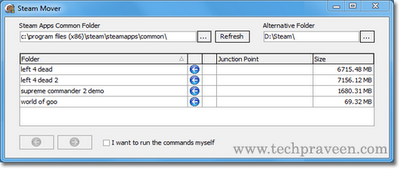
Steam Mover is a portable freeware windows application.With Steam Mover you can easily move installed windows applications, games and other installed softwares from C:\ drive to other drives say D:\ or E:\ drive.Mostly C drive runs out of space due to many installed softwares and Games by Game lovers.Most of the people use some Utilities to cleanup junk files or even uninstall applications ifcomputer slows down.Steam Mover solves your problem.It works only with Windows Vista or Windows 7.It does not support Windows Xp.
It smoothly moves installed software applications to other drives without affecting its registry entries.
Howto Move Installed Application with Steam Mover?
1. Download and run SteamMover.exe.
2. Put the folder in which your applications are installed in Stream apps common folder . The alternative folder is the path where the programs have to be moved (Say D:\).
3. Once the source and destination folders are set you can use the arrow button to move the application in between the folders.
How To Uninstall Steam Mover?
Since its a portable application simply delete SteamMover.exe, and if you really want you can remove the two Registry keys from HKEY_CURRENT_USER\Software\SteamMover\

Download: Steam Mover
No related posts.

Monday, 19 November 2012

How to remotely operate a computer with team viewer software and how it works

How to remotely operate a computer with team viewer software and how it works

Lots of computer software and hardware companies using team viewer to assist  there clients to get rid of problems. Team viewer is a software through which you can remotely operate a computer system by sitting anywhere else on other computer system.You can use team viewer to remotely access your friend's computer system.Is it secure..?? yes it is.. because no one can access your pc till (S)he has your id and password. and password changes everytime you open team viewer.

What is team viewer:- 
It is a Remote desktop utility. by using it u can remotely access any computer by sitting on your computer system.both parties connect to a server which sets up a session between both.


How team viewer works:-
  • One person opens up teamviewer and calls person B.  
  • Person A gives the ID and password to person B.  
  • Person B puts this information in teamviewer and hits connect.
  • now person B can access person A computer.


 Requirements to use team viewer:-


Directions to use team viewer :-
  • Open team viewer
  • Inform second party to open it too.
  • Ask them there team viewer id and password (password changes every time you open team viewer) if you want to acces there system or give them your password and id to allow them to access your computer system.
  • type in there id and password. if you want to access there computer system.
  • Click on " Connect To Partner "
  • now you are all set to access second party computer system.